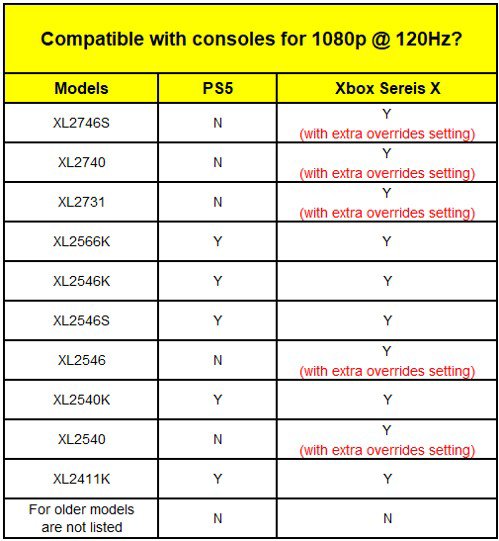
After Sony released the system software update for PS5 in April 2021, the XL2746S, XL2740, XL2731, XL2546, and XL2540 became compatible with 120Hz under 1080p for PS5. If your monitor on the list does not support 120Hz, please update your PS5 to the latest version.
For steps to set additional overrides under Xbox Series X, see below:
- Proceed to 'General' then 'TV & Display Options'.
- Go to 'Advanced' then 'Video Fidelity & Overscan'.
- Change 'Override' in 'Display' from 'Auto-detect (recommended)' to 'HDMI' and click 'Use Manual Settings'.
- Return to the last page and change the resolution in 'Display' to 1080p. Click 'Yes' to keep this resolution.
- Change the refresh rate to 120Hz and click 'Yes' to maintain this refresh rate.